Hands-On: Building a live esports commentary bot leveraging a local LLM and GRID
What the report saysIn a previous blog post, we demonstrated how to use OpenAIs ChatGPT API to extract data from esports events using human language as input. This time, we’re taking things a step further by using OLLAMA…
What the report says
In a previous blog post, we demonstrated how to use OpenAIs ChatGPT API to extract data from esports events using human language as input. This time, we’re taking things a step further by using OLLAMA, a tool that enables you to run LLMs with hardware acceleration on your local machine. This approach offers several benefits: it eliminates usage fees and ensures that the data never leaves your device, providing both cost efficiency and enhanced privacy. Join us in building a live esports commentary bot leveraging GRID Open Access esports data.Set-upTo install OLLAMA please head to ollama.com and download the installer.
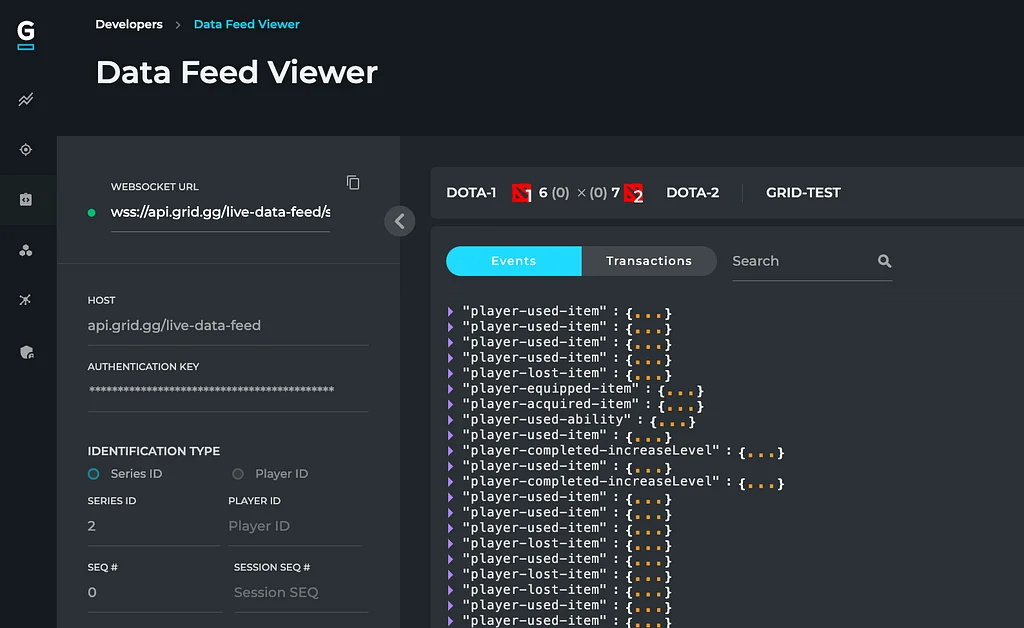
I’m going to use Go for all code samples in this post. In the unlikely event that Go isn’t your preferred programming language, the samples should be easy enough to adapt. You also need a GRID Open Access account. Request access by going to grid.gg.Part 1: Getting Started with GRID APIseriesId := 2apiKey := os.Getenv("GRID_API_KEY")url := fmt.Sprintf("https://api.grid.gg/live-data-feed/series/%d?fromSequenceNumber=0&fromSessionSequenceNumber=&key=%s&useConfig=false", seriesId, apiKey)This endpoint will send us messages containing a list of events, each with a specific type. Of course, these events contain much more data, but let’s worry about that later.type GridMessage struct { Events []GridEvent `json:"events"`}type GridEvent struct { Type string `json:"type"`}We use the URL we built to connect to the ws endpoint.
I omitted the actual connection part for brevity’s sake; the entire example can be found here. Then we loop over the messages we receive and unmarshal them into the structs we declared before. For each of the events, we log a message about what type of event we just received.msgChannel := connectWs(url)for rawMsg := range msgChannel { var msg GridMessage err := json.Unmarshal([]byte(rawMsg), &msg) if err != nil { slog.Error("Couldn't unmarshal message", "error", err) return } for _, event := range msg.Events { slog.Info("New event", "type", event.Type) }}Part 2: Reaching out to OLLAMAFirst of all, we should try to run OLLAMA using the CLI.

Key details
Do so by running ollama run llama3.1 ‘How are you?’. This first invocation will download Llama 3.1, which is a free LLM created by Meta, and start up a background service. Depending on your network connection, this may take a while. You should see something like this in your command line:Now, we’re ready to invoke the LLM in our code. We’ll start by writing a helper function running the same CLI command we just ran.func promptLlm(prompt string) (string, error) { cmd := exec.Command("ollama", "run", "llama3.1", prompt) responseBytes, err := cmd.CombinedOutput() if err != nil { return "", err } return string(responseBytes), nil}Then, we invoke it with a pre-configured prompt, priming the LLM to generate match commentary in the style of a tweet.
I also added a made-up player-killed-player event to demonstrate already how we could incorporate varying esports data into this.const systemPrompt = "You're an esports match commentator. I'll feed you with events that happen during an esports round. For example a player killed player event or things similar. Please always respond with at most 120 characters e.g the length of a tweet. Only talk about the most recent event don't talk about the series as a whole. Here is the most current event:\\n\\n"func main() { response, err := promptLlm(systemPrompt + `{"type": "player-killed-player", "actor": "player-a", "target": "player-b"}`) if err != nil { slog.Error("Couldn't prompt LLM", "error", err) return } slog.Info(response)}The entire example can be found here.Part 3: Integrating OLLAMA for Commentary GenerationNow, putting it all together.
We added a map of ignored event types for which we don’t want to generate commentary. These kinds of events can be very spammy e.g. players tend to buy a lot of items at the beginning of a round for example so we need to ignore them. After checking if we got an ignored event, we prompted the LLM using our system prompt from the previous step + the raw event JSON data. This means the LLM has all the data of the event to generate insights. The LLM could, for example, highlight the item that was purchased or what specific NPC was taken down.var ignoredEvents = map[string]bool{ "player-purchased-item": true, "player-completed-increaseLevel": true, "player-used-item": true, "player-lost-item": true, "game-set-npcRespawnClock": true, "team-picked-character": true,}func main() { /** ... **/ for rawMsg := range msgChannel { var msg GridMessage err := json.Unmarshal([]byte(rawMsg), &msg) if err != nil { slog.Error("Couldn't unmarshal message", "error", err) return } for _, event := range msg.Events { if ignoredEvents[event.Type] { continue } response := promptLlm(systemPrompt + rawMsg) slog.Info(event.Type + ": " + response) } }}The entire example can be found here.We can see messages about the items being purchased and also about a kill.